
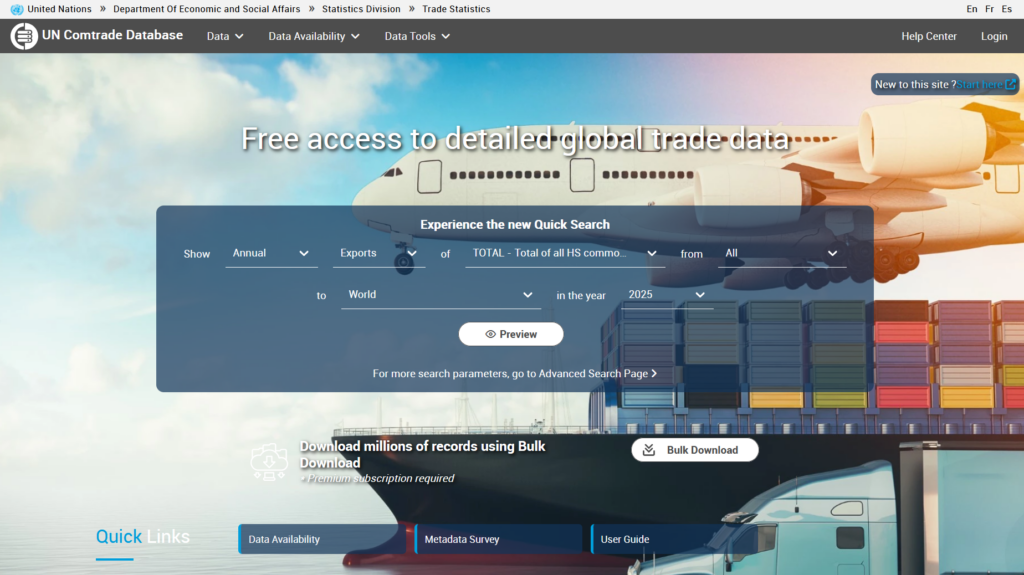
The UN Comtrade home page is the main entry point to access trade data, search tools, and platform features. This page provides an overview of the key components available on the home page and how to use them.
From the home page, you can:
- Search and preview trade data
- Access detailed datasets and tools
- Explore data visualizations
- Navigate to metadata and documentation
- Log in to access advanced features
Quick Search #
The Quick Search feature allows users to immediately access high-level trade data without building a full query. It provides a fast way to explore recent or aggregated datasets.
Navigation Bar
The navigation bar at the top of the page is always visible and provides access to the main sections of UN Comtrade. It serves as the primary navigation tool, allowing users to explore different areas of the platform. Hovering over each menu item reveals available categories and tools.
In the top-right corner, users can select their preferred language (English, French, or Spanish) and log in. Although data is accessible without an account, signing in enables access to additional features and higher download limits. A link to the Help Center is also available, providing documentation and guidance to support users.
Data and Tools
- Data – The Data section is the core of the UN Comtrade platform, where users can access detailed international trade statistics. It allows you to search, filter, and retrieve data by criteria such as product, country, time period, and trade flow.
- Data Availability – The Data Availability section provides an overview of the datasets currently available in UN Comtrade. It helps users understand what data has been reported, released, or is pending, and offers insight into the completeness and coverage of trade statistics.
- Data Tools – The Data Tools section includes additional features and applications designed to help users explore and analyze trade data more effectively.
- Login – The Login option allows registered users to access their accounts and unlock additional features. While basic data access is available without logging in, signing in provides access to more functionalities.
Quick Links – The Quick Links section helps users quickly access the most frequently used pages in UN Comtrade, making it easier to navigate directly to important features and commonly visited resources.
Learn how to build queries
Explore data tools
Create an account
Account Types
Comtrade Trends #
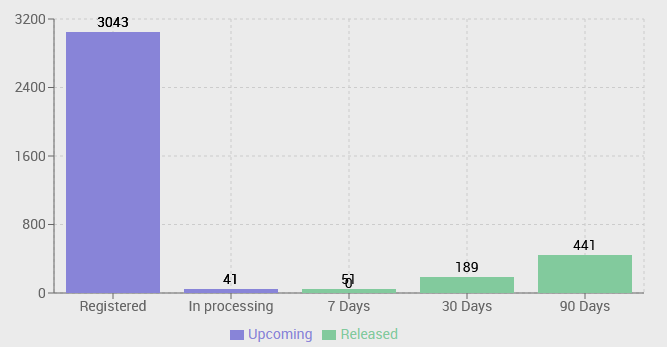
The official trade data is collected and made available to the public on a continuous basis. The Comtrade trends show the number of datasets processed, from registration to release. This information provides valuable insight into the current processing workload and future data releases.
Data visualization of UN Comtrade Data #
The Data Visualization section showcases a variety of interactive visualizations built using UN Comtrade data and metadata. It includes innovative tools, data extraction solutions, and alternative platforms that present trade statistics in dynamic and engaging formats. Many of these visualizations are contributed by external users and partner organizations, demonstrating diverse ways to explore and analyze global trade data.


